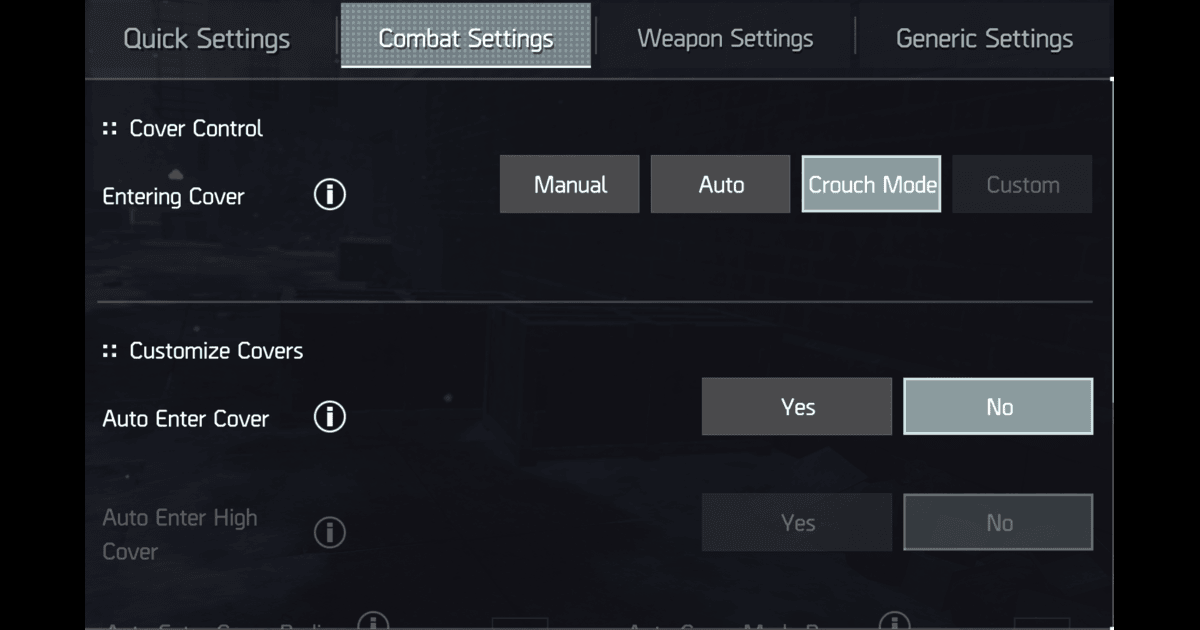
Q: Why do I keep dying the instant I peek? A: Because your Entering Cover is set to Auto, your Auto-ADS is on Enable All, and your ADS View isn’t on Mixed. Fix the settings, then learn the input. In that order. Anything else is cope.
You’ve watched the top Conflict streamers do it. They sit in cover, something twitches, and the enemy on the other side of the lane is just… dead. No long ADS animation. No exposure window. The peek is so fast it looks like a cheat.
It isn’t. It’s called Center-ADS Release , a frame-tech that uses a 3-frame ghost-peek window from inside cover, where you become visible to the server just long enough to land a shot but not long enough for the enemy AI (or, in PvP, for the netcode) to register damage back at you.
Here’s the part nobody writes down: the input doesn’t work on default settings. If you’ve tried this and quit because “it’s not real,” it’s real. Your settings are blocking it. And you’ve probably been blaming your thumbs for two months like a civilized adult.
Why This Is the Most Underrated Tech in the Game
Resurgence is a mobile-first looter-shooter with full cross-play to PC. That means the engine has to handle both touchscreen aim and a 144Hz mouse trying to micro-adjust mid-peek. The engine’s compromise is a stack of “assistance” settings that are on by default and that quietly fight you the moment you try to do anything precise.
Top players turn the assistance off and flip the camera and ADS toggles into their “Mixed” modes. That’s when they discover the cover camera and the ADS toggle don’t share the same frame budget on the default setup , and that gap is where the peek lives.
This isn’t speculation. Every leaderboard PvP player I’ve watched is running some version of the same settings layout, and every one of them is exploiting the same window. The community just hasn’t written it down in one place , partly because writing guides doesn’t earn DZ credits. So here it is, free of charge.
The Settings Checklist (Do This First)
Walk this list top to bottom. The cover toggles live in Combat Settings and Quick Settings; the ADS settings live in Quick Settings → Weapon or Weapon Settings; the graphics settings live in Graphics Settings. If any one of these is wrong, the input below will not work. Don’t skip ahead. Yes, there are 14. Yes, all of them matter. Welcome to the Division.
| # | Where | Setting | Set to | Why |
|---|---|---|---|---|
| 1 | Quick Settings → Cover Control | Entering Cover | Crouch Mode | Manual is too slow for the peek; Auto yanks your character into cover when you don’t want it. Crouch Mode is the goldilocks , you stay in the light/camera-cover state where Mixed ADS can do its work. |
| 2 | Combat Settings → Customize Covers | Auto Enter Cover | No | This is the actual “auto-cover” everyone complains about. With it on, the game will pull you into the nearest cover whenever you crouch near one , including mid-peek. Off, always. If you leave this on, don’t @ me when you die. |
| 3 | Combat Settings → Customize Covers | Auto Enter High Cover | No | Same reason as above, but for chest-high cover. High cover also kills the camera-cover blend, which is exactly what the tech needs. |
| 4 | Quick Settings → Auto-ADS | Auto-ADS | Mixed (or Disable All) | Default is Enable All, which auto-zooms you on every shoulder-fire. That auto-zoom eats the same frame budget Center-ADS Release needs. Mixed lets you choose which weapons auto-ADS; Disable All is the safest answer if you don’t want to think about it. |
| 5 | Quick Settings → Weapon | ADS View | Mixed | This is the “Mixed ADS” the top players talk about , it lets your cover camera and your ADS camera share frames instead of fighting each other. Without Mixed here, the peek window collapses to zero. See the explainer below. |
| 6 | Weapon Settings | Aim Mode | Tap | This is the actual “First-Person ADS Toggle” the older guides reference. Hold and Mixed both force continuous touch on the ADS button during the release frame , which means your shot physically cannot land on release. Tap is non-negotiable for this tech. If you skip this one, the rest of the list is decoration. |
| 7 | Settings → Sensitivity → Touchscreen Sensitivity | Sensitivity Acceleration (X) | Minimum | Sensitivity Acceleration is a numeric slider, not a toggle , defaults can ship as high as X:200/Y:150. Drop both X and Y to the slider’s lowest stop. Repeat for the Firing Sensitivity block in the same menu. Any acceleration means your tap of ADS travels a different distance every time. The peek requires consistency. |
| 8 | Settings → Sensitivity → Touchscreen Sensitivity | Sensitivity Acceleration (Y) | Minimum | Same reason, vertical axis. Both axes must be at their slider minimum. If you left one on default for months and just now discovered it , yes, that explains a lot of your career decisions in Conflict. |
| 9 | Graphics Settings | Framerate | Unlimited (or the highest your device sustains) | Higher framerate = smaller, more precise input windows. If your phone overheats at Unlimited and starts dropping into the 30s, lock it to 60 instead , a stable lower framerate beats a thermal-throttled high one. |
| 10 | Graphics Settings | Resolution | High (or Standard if you’re thermal-throttling) | Sharper edges = better cover reference points. Drop to Standard if you need the headroom to keep framerate stable. |
| 11 | Graphics Settings | Shadow Quality | Low | Shadow rendering is the single biggest frame-time spender on mobile. Drop it to keep your framerate stable in 8-man fights. On PC this matters less, but your PC probably doesn’t thermal-throttle on your lap at a Denny’s. |
| 12 | Graphics Settings | VFX Quality | Low or Medium | Default is Very High. Muzzle flash, smoke, and impact effects love to obscure the exact cover edge you’re using as a reference. Drop it. Your eyes are aging; help them out. |
| 13 | Graphics Settings | Bloom | Off | Bloom blooms bright sources (lights, muzzle flashes) into your line of sight during a peek. Pure visual clarity wins here. |
| 14 | Graphics Settings | Shoulder Aim Depth of Field | Off | This blurs everything around the target reticle when you ADS. Looks cinematic, hides exactly the peripheral cover edge you need to track. Off. You’re not filming a Marvel movie; you’re farming rogues. |
That’s the checklist. If you got this far and just realized Auto Enter Cover has been Yes on your account for two months , yes, that’s why. Welcome. You’re one of us now.
What “Mixed” Actually Does (And Why the Menu Doesn’t Explain It)
Resurgence has two settings with “Mixed” as an option, and confusing them is why half the people who try this tech give up:
- Auto-ADS → Mixed controls which weapons auto-zoom for you. This is convenience; not the magic toggle. You can run this as Mixed or Disable All , your call.
- ADS View → Mixed is the actual frame-tech toggle. It controls how your cover camera and your ADS camera share input frames. This is the one that matters.
Here’s what ADS View Mixed actually does:
- Third Person: Cover camera and ADS camera are two separate states. Switching costs you a transition animation , a noticeable beat of “I am visible but I cannot shoot yet.” Death sentence in Conflict. Might as well send the enemy a calendar invite.
- First Person: ADS is fast but you lose the cover camera entirely, which means no peek frames at all.
- Mixed: The two cameras share input frames. You can be in cover camera and your bullets can land during the transition out, not after it. That transition is the Center-ADS Release.
The peek window itself is tight , anecdotally a small handful of frames. Narrow enough that bad sensitivity acceleration will blow right through it, but wide enough that with a clean tap input, you can land a shot before the enemy client even renders you.
This is also why the tech is camera-cover-dependent. If you’re locked into hard cover (Auto Enter High Cover = Yes does this to you constantly), the cover camera isn’t active and Mixed has nothing to blend. You need Entering Cover on Crouch Mode and Auto Enter High Cover off.
The Center-ADS Release Input, Step by Step
Once your settings are right, the input itself is dead simple. The difficulty is timing, not complexity. If you can double-tap your phone to zoom into a photo, you can do this.
- Hold light cover. Approach a cover edge, slide into it, but do not press the hard-cover button. You should still be able to swivel the camera freely.
- Center your crosshair. Pre-aim where the enemy’s head will be. The peek is too short to acquire and shoot , you have to acquire first, then peek. This is not a gunfight; it’s a magic trick. The reveal comes after the setup.
- Tap ADS. Not hold. Tap. Press and release in the same input cycle. On controller this is a quick squeeze of left trigger; on touch, a single tap of the ADS button. Aim Mode must be on Tap for the release to register as an input , Hold and Mixed eat the release frame.
- Fire on release. Your shot lands during the release frames, not the press frames. This is the part everyone gets backwards on their first 50 tries.
- Already back in cover. Because you released ADS instead of holding, your character animates back into cover automatically. The enemy sees: nothing, muzzle flash, nothing. They type “hacker” in chat. You type nothing, because you’re already aiming at the next target.
That’s the whole tech. If steps 2–4 feel like they need to happen in a single motion, that’s because they do. Think of it as one input with a beat in the middle.
Practice Drill: 5 Minutes to Muscle Memory
Go to any Hostile Nest on Normal. Find a piece of waist-high cover with a clear sightline to a spawn point. Sit on it. Tell your clan you’re “theory-crafting.”
- Minute 1–2: Just tap ADS in and out from cover. No shooting. Get used to the camera not fighting you. This is also when you’ll catch any settings you missed , if the camera feels like it’s wrestling you, something from the checklist is still on default.
- Minute 3–4: Pre-aim at a spawning enemy’s head height, tap-release, fire on release. Don’t aim adjust mid-peek , that’s what sensitivity acceleration was for, and you turned it off, so trust the pre-aim.
- Minute 5: Chain three peeks in a row on three different enemies without leaving cover. If you can do this consistently, you have the tech. If you can do it while your kid asks you what’s for dinner, you have mastery.
You will miss a lot on the first day. That’s fine. The settings are the actual unlock , once those are right, the input is just reps. It’s like learning to ride a bike, except the bike is your phone and the pavement is the Conflict leaderboard.
Weapons That Benefit Most
Center-ADS Release is weapon-agnostic in theory, but in practice the payoff scales hard with damage-per-shot. You only get one or two bullets per peek, so make them count.
- Bolt-action snipers and DMRs are the perfect home for this tech. One shot, one peek, one kill. Look for weapons with the Cover Shooter talent (cover crits grant +16% CHD up to 3 stacks at an 80% proc rate) and pair with the Cover Shooter Gold Firepower OS for a +15% Weapon Damage baseline.
- High-damage ARs like the Warlord work if you can discipline yourself to fire 2–3 round bursts instead of holding the trigger. The peek is too short for sustained fire anyway. Trigger discipline is the real endgame boss.
- Shotguns are the wildcard. Double Barrel in particular benefits because the entire payload lands in the release window , but only at close-to-mid range, which means you’re picking your cover spots carefully.
Avoid full-auto LMGs and SMGs for this specifically. Their DPS is in sustained fire, and sustained fire is what Center-ADS Release explicitly avoids. If you’re holding the trigger down, you’re not peeking , you’re posing.
Want a full sniper build that makes the most of this tech? Stay tuned — we’re working on a dedicated Cover-Shooter Sniper build designed around this exact technique.
Why This Works (The Boring Frame-Data Part)
If you stayed for the boring part, respect. Here’s the short version:
Resurgence’s netcode validates damage against your character’s visibility state on the server tick that the damage event arrives. When you’re in cover camera, your character model is server-side flagged as “in cover.” When you ADS, that flag clears , but only after the camera transition completes. With Mixed ADS enabled, your bullets register against the enemy’s hitbox during the transition, but your own hitbox is still flagged in-cover for those same frames.
In practice that means: you can shoot them, but for those ~3 frames, they cannot shoot you. Then the transition completes, your in-cover flag clears, you’re vulnerable , except you’ve already released ADS and the animation is pulling you back into cover. By the time anyone’s bullet reaches your hitbox, you’re gone again.
This is also why sensitivity acceleration ruins it. The tap-release has to be a clean, repeatable input. Any acceleration means the camera is still moving on the release frame, which means your shot lands on whatever happened to be under the crosshair instead of where you pre-aimed. The slider defaults (X:200 / Y:150) are insane for precision work , drop both to minimum.
Common Failure Modes
If you’re doing everything right and it still doesn’t work, run through this list before you post “this doesn’t work” in the Discord:
- “My character keeps snapping into cover.” Auto Enter Cover is still on Yes. Go back to setting #2. It’s in Combat Settings, not Quick Settings , that trips up a lot of people.
- “My character keeps locking into the tall cover I didn’t want.” Auto Enter High Cover is on. Setting #3.
- “I peek but I can’t get the shot off in time.” You’re acquiring during the peek instead of pre-aiming. Center your crosshair first, then tap ADS.
- “I tap ADS and nothing happens on release.” Aim Mode is set to Hold or Mixed. Switch it to Tap in Weapon Settings. This is setting #6 , the one that physically enables “fire on release.”
- “The first peek works but the third one gets me killed.” Your sensitivity acceleration isn’t at minimum. Check both X and Y sliders. One of them is probably still at the factory-default 200.
- “I’m on ADS View First Person and it still doesn’t work.” First Person kills the cover camera. Switch to Mixed.
- “I’m doing it in the Dark Zone and it just doesn’t work.” Latency. DZ servers are noisier than mission instances. The frame window is the same but variance is higher. Stick to Conflict and PvE to learn it, then take it to DZ.
- “My phone is throttling and the peeks feel inconsistent.” Drop Framerate from Unlimited to 60 and Resolution to Standard. A stable 60 beats a thermal-throttled rollercoaster every time. Also maybe stop playing in the car on your lunch break with the sun beating on your screen. Or don’t. I’m not your dad.
Got the tech working? Tag us on X or drop a clip on Reddit , we want to see your cleanest cover clears. Got a settings combo that works better than the one above? Even more interested. Got a therapist who specializes in mobile game addiction? DM me. , RapidF5
Cover-Peek Tech Exposed
The top Conflict streamers' cover-peek technique uses 14 settings and one tap input. Here's the whole playbook.
Frequently Asked Questions
What is Center-ADS Release in Division Resurgence?
A 3-frame cover peek technique that lets you pop out of cover, land a shot, and return to cover so fast that the enemy barely registers you were there. The game's netcode creates a tiny window where you're visible to the server but not long enough for enemies to return accurate fire. The cover system was designed this way intentionally.
Is the cover peek technique considered an exploit?
No. Center-ADS Release uses the game's intended cover mechanics. You're pressing buttons the game gives you in an order the game allows. If it were considered an exploit, it would have been patched already. Use it guilt-free.
Can I do Center-ADS on mobile or only on PC?
Both, but mobile is significantly harder because you're doing precise timing on a touchscreen. PC players with a mouse have a massive advantage for cover peeking. If you're on mobile, consider a controller or a tablet with a bigger screen. The difference between a clean peek and a sloppy one is milliseconds, and fat-fingering on a 6-inch screen adds milliseconds you can't afford.
Why do streamers kill so fast from cover in Division Resurgence?
Because they've mastered Center-ADS Release and you haven't. That's literally the entire gap. They're using the same weapons, the same builds, and the same cover system. They're just executing the peek 10x faster because they've practiced it until the input sequence is muscle memory. Good news: you can learn it too. Bad news: it takes practice. We know that word scares you.
Does Center-ADS work in Division Resurgence PvP?
It's MANDATORY in PvP. At any competitive level of Conflict or Dark Zone PvP, every player is cover peeking. If you're not doing it, you're the one dying in every lane fight wondering why the enemy seems to kill you without ever being exposed. They are being exposed. For three frames. Learn the technique or accept that PvP will remain a frustrating mystery forever.
Comments
Join the discussion — powered by GitHub Discussions. No tracking, no ads.